
09.Insurance
Overview
The user (pricing manager of Kazunion tour operator) receives different insurance terms from insurance suppliers and registers them as programs. Then insurance packages are created based on programs and are available for agents to sell alongside with full packages.
The user (a selling agent of Kazunion) may sell insurance as an additional service when booking includes only tours.
Insurance module allows to choose between different Insurances/additional supplements and have authority to sell specific insurance to selected tourists individually.
This functionality is available only for Nugioscore Kazunion only for the moment.
Primary Users
Reservation department, System Administrator
Navigation Path
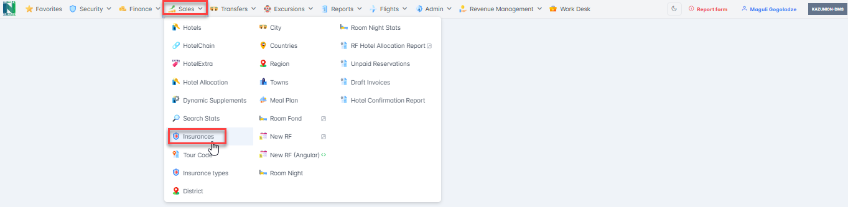
Nugioscore/Sales/Insurance
Business Description
Programs
Features and Functionalities
The received different insurance terms from insurance suppliers are registered as programs in the system. Then insurance packages are created based on programs and are available for agents to sell alongside with full packages.
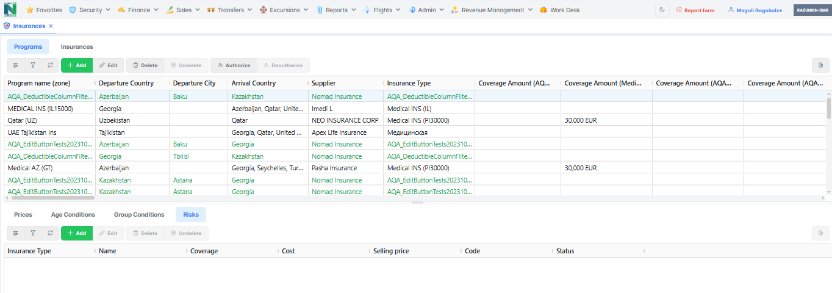
This is a space where the user is allowed to create/edit the insurance programs. The detailed information about programs is registered using button Add/Edit Program.
When added/edited, a program is saved as Draft. There are three types of status of the records, and toolbar elements for this kind of records may be different as per status :
- Draft records- color is green and can be authorized or deleted
- Approved records - color is black and can be deauthorized only
- Deleted records - color grey, can be only undeleted
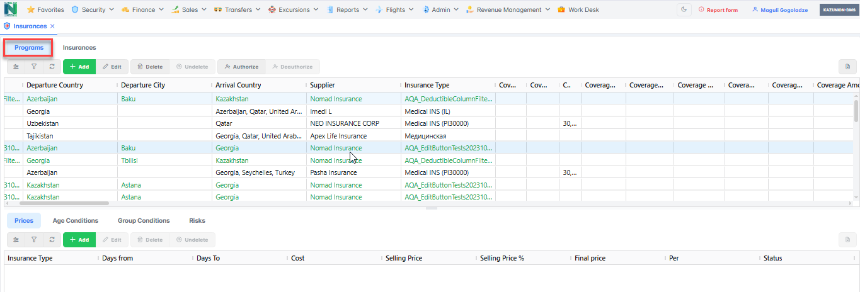
The page where Programs Tab is located is divided into two Grids. The Programstab is in the Upper Grind.
The Grid Below, Program Detailsinclude tabs as Prices, Age Conditions, Group Conditions and Risks, shows/allows to add detailed information about particular insurance Program. Accordingly, the information in the grid below changes according to the programs selected in the upper grid.
Buttons Description
| Grid Options | A detailed description see here: Grid Options | ||||||||||||||||||||||||||
| Filter Options | A detailed description see here: Filter Options | ||||||||||||||||||||||||||
| Refresh | A detailed description see here: Refresh | ||||||||||||||||||||||||||
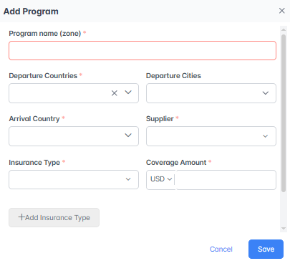
| Add/Edit | This section allows to user to register/Edit received different insurance terms from insurance suppliers and create the Programs. If any of the mandatory fields stay empty during the registration process, the notification comes out: Please Fill in the Information. If a user enters an incorrect information type, the system shows a text directly in the field: Incorrect Information. Note: The Edit button is always active/visible only when the record has a "draft" status.
| ||||||||||||||||||||||||||
| Delete/Undelete | Needs Info | ||||||||||||||||||||||||||
| Authorize/Deauthorize | This feature is available to some specific users only who has been granted special permission to authorize/deauthorize the created insurance program and its terms in the Nugioscore system.
After Authorization Programs/Insurance should be active/published. It is important to mention that it is impossible to Authorize/Activate Programs without prices attached. When the program is authorized in the Insurance tab and in the Published column it has the status "yes" but if you deauthorize the program, in the Insurance tab and in the Published column it gets the status "No". | ||||||||||||||||||||||||||
| Export to Excel | A detailed description see here: Export to Excel |
Grid Columns Description
| Name | Description | Database Name |
| Program name (zone) | ||
| Departure Country | ||
| Departure City | ||
| Arrival Country | ||
| Supplier | ||
| Insurance Type | ||
| Coverage Amount | ||
| Transportation & Repatriation | ||
| Deductible | ||
| Status |
Insurances
Features and Functionalities
Kazunion agents sell insurance as an additional product while booking tours. Till today insurance type, price, coverage amount and currency are fixed.
A pricing manager (from nugioscore.kazunion) registers/adds prices, programs and insurances in order to record insurance conditions provided by suppliers and create a competitive insurance package to sell.
In order to create Insurance in the Insurance Module, a pricing manager presses Add/Edit Insurance button, fills in form with info provided by the suppliers and save it, Insurance record is saved as Draft. To activate the insurance record a manager should authorize the draft.
Insurance will be sold only as a component of whole package.
It is important to mention that a Kazunion manager won't be able to add Insurance without Program attached. As soon as Insurance becomes authorized it becomes available for usage and it will be impossible to Authorize/Activate Programs without prices attached (see Insurance Creation Flow).
When Kazunion agent will start booking process, specific parameters are sent to the nugioscore to be reviewed (Integration with Kazunion -->Parameters from Kazunion to receive Insurance Data). When nugioscore receives specific parameters from Kazunion web, it assess them and calculate the best/most suitable price for the booking.
After the best price calculation, nugioscore sends it back to the Kazunion web and the information is displayed in the same pop-up window as it is today.
After the booking process, the whole information (reservation) is entered in nugioscore reservation forms, where it is handled by the reservation managers and accountant coordinators accordingly.
After the reservation will be evaluated and approved sold Insurance will be activated.
It is important to note that:
- Insurance will not be created without a program attached;
- When a program will be deauthorized ➝ the Insurance (using the particular program) should be deauthorized as well. Consequently, deauthorized insurance should be authorized manually to be active again.
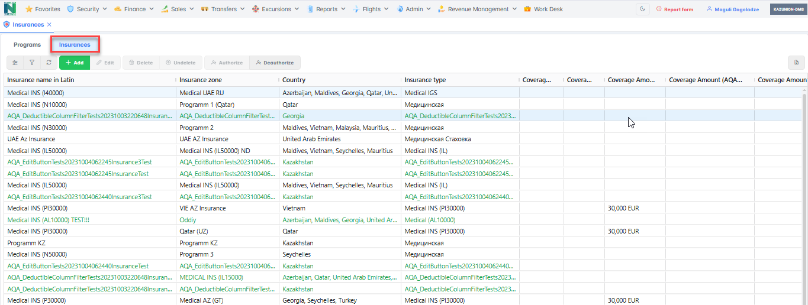
Buttons Description
| Grid Options | A detailed description see here: Grid Options |
| Filter Options | A detailed description see here: Filter Options |
| Refresh | A detailed description see here: Refresh |
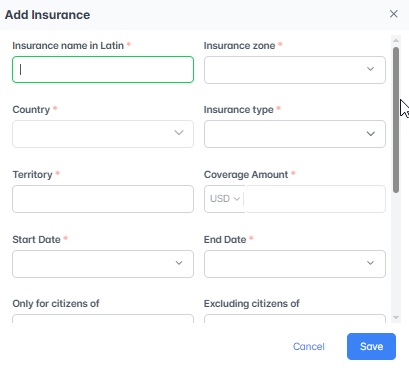
| Add/Edit | Creation/Correction of an Insurance is possible through using Insurance Tab ➝Add/Edit Insurance buttons.
Note: When insurance and Add/Edit Insurance pop-up is open (after pressing Add/Edit Insurance button), after choosing the specific program (in the Insurance Zone field) the following fields must be filled automatically from the program grid: Country, Coverage (medical) according to insurance type. |
| Delete/Undelete | Needs Info |
| Authorize/Deauthorize | |
| Export to Excel | A detailed description see here: Export to Excel |
Technical Description
Architecture Overview
The Client Balance module has the following architecture:
Code Link
Frontend:
Backend:
Project: RustarOnline.WebApi
Databases and Tables
| Database Type | Database Name | Table Name* | Table Description* |
| MSSQL | All NugiosCore Databases | finance._get_client_balance Procedure* | View of invoices and documents balance by contragents |
Data Types of Tables
finance._get_client_balance Procedure*
| Field Name | Display Name | Field Type | Short Description |
| OInvHID | N/A | uniqueidentifier | For invoices: Finance.IncInvoiceHdr [IInvHID] or Finance.OutInvoiceHdr [OInvHID]; ID of invoice (for tech) For documents: Finance.BankDocument [BDID] or Finance.CashDocument [CDID]; ID of document (for tech) |
Log Details
The log files are stored in a designated location: https://elkalyzer.nugios.services/app/discover
Additional
References
| Cross-references | N/A |
| Related modules | Incoming and Outgoing Invoices, Bank and Cash documents, NewRF |
| Media library | N/A |
Contact Us
If you notice any inconsistencies or have comments, please don't hesitate to leave it to us. Your feedback is valuable.